Service Level Objective Aware Serving
Instead of contiunous batching, LLMBoost leverage a customizable service level objective (SLO)-aware scheduling to offer users the flexibility to meet specific SLO constraints while at the same time keep high throughput.
When serving LLMBoost, user can specify their target Time-to-first-token (TTFT) constraint using --slo_ttft_ms <value>. Below is the performance comparison for Llama3.1-8B on a single MI300X GPU before and after enabling the SLO-aware serving.
As the query-per-second (QPS) becomes more intensive, SLO-aware LLMBoost demonstrates a 1x - 3x faster TTFT than default.
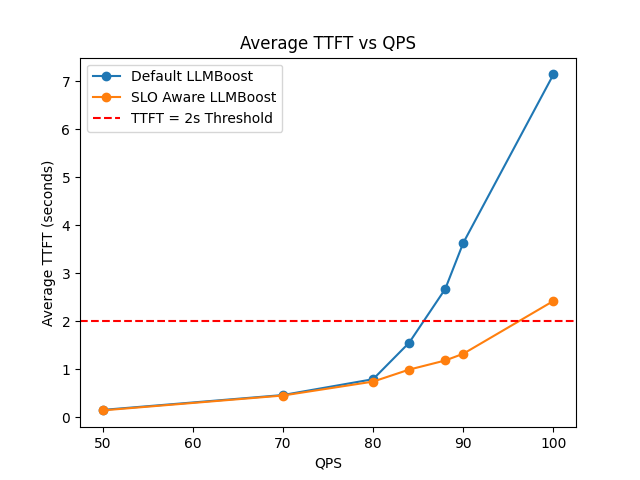
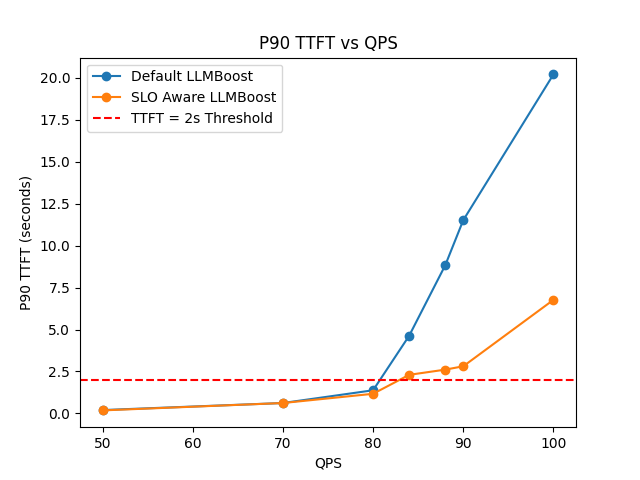
In general, setting --slo_ttft_ms <value> can give you a soft-guarantee (target SLO might be violated when QPS is very intensive) of the TTFT and at the same time keep the same throughput performance.
Getting Started
- Using LLMBoost Hub
- Manual Setup
Start the Streaming Server
# Deploy a model
lbh serve meta-llama/Llama-3.1-8B-Instruct -- --slo_ttft_ms 1000 --dp 1 --tp 1
The server will be available at http://localhost:8011 by default.
Start the Server
The below command should be executed inside the LLMBoost Docker container, which you can run using the manual docker setup. Then, inside the container, launch the service by the command:
llmboost serve --model_name meta-llama/Llama-3.1-8B-Instruct --slo_ttft_ms 1000 --dp 1 --tp 1
The server will be available at http://localhost:8011 by default.
NOTE:
--slo_ttft_ms <value>specifies the expected SLO constraint of time to first token (TTFT) in milliseconds. Default isNone, indicating no SLO constraint.
Performance Example
After the server is ready, you can send a query-per-second(QPS) intensive workload by using the benchmarking script we prepared inside the LLMBoost docker container. To open an interactive bash shell within your running model container, use:
lbh attach meta-llama/Llama-3.1-8B-Instruct
Once inside the container, run the following benchmarking command:
python3 apps/universal_benchmark.py \
    --model_name meta-llama/Llama-3.1-8B-Instruct  \
    --num_prompts 10000 \
    --endpoint http://127.0.0.1:8011/v1/chat/completions \
    --max_tokens 1024 \
    --benchmark_latency \
    --pps 82 \
    --streaming
NOTE: This workload is for demonstrating the performance on AMD MI300X GPU. Please adjust the
--ppsto control the query-per-second according to your hardware capacity.
The performance metrics (TTFT and throughput) will be reported once the whole workload is finished. You can compare the performance with and without SLO-aware serving, where we observe TTFT enhancement.